Delete Old VMFS Datastores
Danger
This step is only necessary if you are transitioning from VMWare.
This section will walk you through deleting your old VMFS datastores if you are migrating from VMware.
Note
In this example, the server is host22. This is also being completed on an older Lenovo High Performance Server specification from NDG with two NVMe SSD drives. Your system may vary.
Danger
Before you complete the next steps, make sure you have removed all VMware virtual machines from these datastores.
Using your navigation panels, in the Resource Tree, navigate to Datacenter > your_server. In the Content Panel, select Disks.
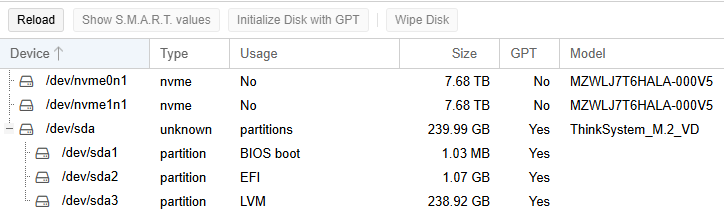
If you are migrating from VMware, you will notice that /dev/nvme0n1, and possibly /dev/nvme1n1 if you have a second drive, will have an existing partition with a usage of VMFS_volume_member.
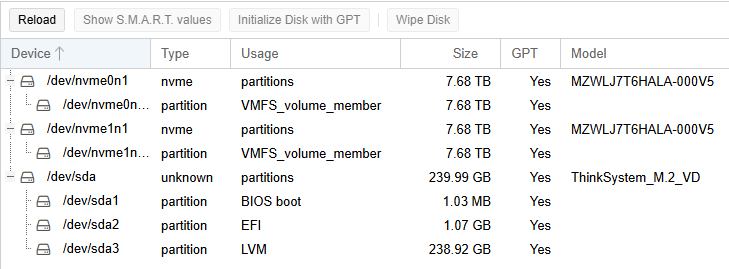
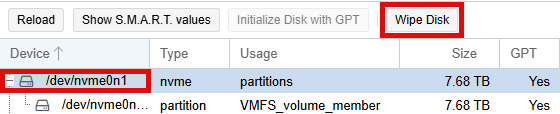
To remove these old datastores, you will need to select /dev/nvme0n1 and click the Wipe Disk button.
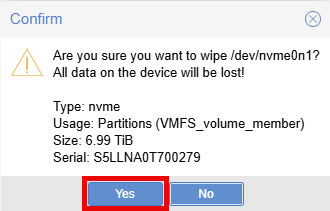
In the Confirm popup window, click on the Yes button.
If you have a second NVMe drive, repeat the steps above for/dev/nvme1n1. You can continue this guide.
You should see a similar output below: