Virtual Network Directives
Virtual Switch Directives are used to create networks within a pod. These networks can be used to connect virtual machines to each other and to real equipment in a pod.
The following terminology is used in this section:
NETLAB+ Term |
VMware/vSphere Equivalent |
Proxmox Equivalent |
|---|---|---|
Virtual Switch |
Standard Switch (vSS) |
Linux Bridge |
Port Group |
Port Group |
VLAN |
Virtual Switches
A virtual switch is a software-based network switch that operates on the virtual host system (i.e. hypervisor).
Virtual switch directives start with the
vswitchprefix followed by a number (e.g.,vswitch.0).Virtual switch numbers must be sequential starting with
0.Do not skip numbers in the sequence.
Port Groups
A port group is a logical grouping of ports on a virtual switch, providing a way to apply consistent configuration settings across those ports. A port group is a policy construct that is defined on a virtual switch. Each virtual machine network adapter is assigned to a port group based on pod design directives.
Port groups can have several settings:
- VLAN ID:
Used to segregate network traffic using 802.1Q VLAN tagging. Traffic on a port group with a specific VLAN ID is isolated from traffic on other VLANs. Only devices that are part of the same VLAN can communicate with each other directly.
- Promiscuous Mode:
Allows all traffic in a port group to be seen by all virtual machines connected to the port group, regardless of the destination MAC address. This is useful for network troubleshooting (using packet sniffing tools) or for intrusion detection systems.
- MAC Address Changes:
Allows virtual machines to change their MAC address.
- Forged Transmits:
Allows virtual machines to transmit packets with a MAC address that is different from the MAC address assigned to the virtual machine’s network adapter.
Port groups are defined within a virtual switch:
Port group numbers must be sequential starting with
0.Do not skip numbers in the sequence.
Naming Conventions
The naming conventions for virtual networks are different for Proxmox and VMware vSphere and Proxmox.
Proxmox
Virtual switches in Proxmox are created as Linux bridges. NETLAB+ creates a
Linux bridge named nlbXXXXXX for each virtual switch in the pod design, where
XXXXXX is a random. This convention allows NETLAB+ to create multiple virtual
switches on the same host without conflicting with other virtual switches that
may be created by the administrator or other applications, while not exceeding
the Linux kernel bridge name length limitations.
Port groups are created as VLANs on the Linux bridge. The name assigned to the port group in the pod design is a logical name that is not used in the Proxmox/KVM environment.
VMware vSphere
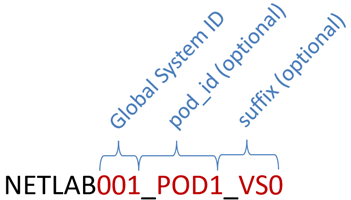
Virtual switches in VMware vSphere are created as standard switches (vSS). The
default naming convention is NETLABx_PODy_VSz, where x is the
NETLAB+ global system ID, y is the pod ID, and z is the virtual switch
number.
Global System ID is a unique number assigned to the NETLAB+ system. Normally
001, but can be altered by the administrator when multiple NETLAB+ systems
share a virtual host environment (which is discouraged).
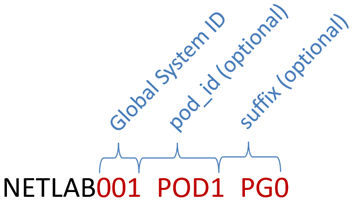
Port groups in VMware vSphere have similar naming conventions. The default
naming convention is NETLABx_PODy_PGz, where x is the NETLAB+ global
system ID, y is the pod ID, and z is the port group number.
Note
The default naming convention for virtual switches and port groups for VMware vSphere can be overriden by deperacated directives. This is not recommended as they have no effect on Proxmox/KVM. See the Deprecated Directives section for more information.
vswitch.<n>.ports
This directive sets the maximum number of switch ports to create on the virtual switch. Higher numbers may be required for larger pod designs and will consume more resources. Lower numbers will consume fewer resources.
Syntax
vswitch.<n>.ports=<p>
<n>is the virtual switch number:0,1,2, etc.<p>is the number of switch ports to create on the virtual switch, default is16.
Note
This setting is currently ignored on Proxmox, however this may change in the future.
Examples
vswitch.0.ports=8
vswitch.<n>.portgroup.<p>.id
A NETLAB+ identifier for the port group used to connect virtual machines to the port group.
The identifier is used to connect virtual machines to the port group.
It must be unique within a pod design.
It is not used as the port group name on the virtual switch.
Syntax
vswitch.<n>.portgroup.<p>.id=<text>
<n>is the virtual switch number (0, 1, 2, etc.)<p>is the port group number (0, 1, 2, etc.)<text>is a unique identifier for the port group.
Examples
vswitch.0.portgroup.0.id=LAN
vswitch.0.portgroup.1.id=DMZ
vswitch.0.portgroup.2.id=WAN

# IGNORED because portgroup 3 is missing
vswitch.0.portgroup.4.id=OOPS
vswitch.<n>.portgroup.<p>.vlan.mode
The VLAN mode for the port group.
Syntax
vswitch.<n>.portgroup.<p>.vlan.mode=<mode>
<n>is the virtual switch number (0, 1, 2, etc.)<p>is the port group number (0, 1, 2, etc.)<mode>is one of the following values:
Mode |
Meaning |
|---|---|
|
No VLAN tagging is used (default). In VMware, this equates to a VLAN ID of |
|
Traffic in the port group is tagged with a specific 802.1Q VLAN
identifier, specified by the |
|
Hosts in the port group are responsible for VLAN tagging. This mode is
seldom used as it requires every virtual NIC assigned to the port group to
be configured as a trunk. In VMware vSphere, this equates to a VLAN ID of
|
Warning
The UNTAGGED mode (default) is recommended if you have a single
network in the pod design. If you have multiple networks in the pod design,
TAGGED is usually the correct choice.
Example 1
# Create one network on a virtual switch with untagged traffic.
vswitch.0.portgroup.0.vlan.mode=UNTAGGED
vswitch.0.portgroup.0.id=LAN
Example 2
# Create two networks on a virtual switch using VLAN tagging
# two separate the networks.
vswitch.0.portgroup.1.vlan.mode=TAGGED
vswitch.0.portgroup.0.id=LAN
vswitch.0.portgroup.0.vlan.id=10
vswitch.0.portgroup.1.id=WAN
vswitch.0.portgroup.1.vlan.id=20
vswitch.<n>.portgroup.<p>.vlan.id
The VLAN ID for the port group.
Required when VLAN mode is
TAGGED.Ignored when VLAN mode is not
TAGGED.
Syntax
<n>is the virtual switch number (0, 1, 2, etc.)<p>is the port group number (0, 1, 2, etc.)<id>is the VLAN ID to assign to the port group (1-4094).
Example
# Create three networks on a virtual switch using VLAN tagging.
vswitch.0.portgroup.1.vlan.mode=TAGGED
vswitch.0.portgroup.0.id=LAN
vswitch.0.portgroup.0.vlan.id=10
vswitch.0.portgroup.1.id=WAN
vswitch.0.portgroup.1.vlan.id=20
vswitch.0.portgroup.2.id=DMZ
vswitch.0.portgroup.2.vlan.id=30
vswitch.<n>.portgroup.<p>.allow_promiscuous
If enabled, the port group allows virtual machines to enter promiscuous mode. The default is disabled.
All network traffic visible on the vSwitch is allowed to be seen by all virtual machines connected to the port group, regardless of the destination MAC address.
Promiscuous mode is often used for network troubleshooting (using packet sniffing tools) or for intrusion detection systems.
Enabling promiscuous mode can have security implications, as it allows a virtual machine to see all network traffic, not just the traffic that is destined for it.
Promiscuous mode requires additional CPU resources as all network traffic must replicated to all ports.
Warning
Promiscuous mode should be used with caution as it can have security implications and incur additional CPU overhead.
Proxmox
On Proxmox VE, promiscuous mode is not directly supported. NETLAB+ works
around this by setting setting the maximum MAC address age on the Linux bridge
to 0. Since the bridge never learns MAC addresses, all traffic (including
unicast) is broadcast to all ports, essentially emulating a hub. However, if one
port group on a virtual switch is enabled, all port groups on the Linux
bridge will be promiscuous. In addition, promiscuous mode is configured on pod
startup and does not persist across restarts of a Proxmox host. This is usually
not a problem but should be noted for long-running pods.
Tip
Since promiscuous mode is set on the entire Linux bridge in Proxmox, it is recommended to use a separate Linux bridge for port groups that require promiscuous mode. This will limit the impact of promiscuous mode to only those port groups that require it when the pod design is implemented on a Proxmox host. The NETLAB+ implementation of promiscuous mode is a workaround and may change in the future as Proxmox matures.
VMware vSphere
In VMware vSphere, promiscuous mode is a security policy setting at the port group level on a vSwitch. When enabled, all network traffic visible on the vSwitch is allowed to be seen by all virtual machines connected to the specified port group.
Syntax
vswitch.<n>.portgroup.<p>.allow_promiscuous=<value>
<n>is the virtual switch number (0, 1, 2, etc.)<p>is the port group number (0, 1, 2, etc.)<value>is either 1 (enabled) or 0 (disabled).
Value |
Meaning |
|---|---|
|
Enable promiscuous mode on the port group. |
|
Disable promiscuous mode. (default). |
Example
In this example, the pod design requires three network segments: LAN, WAN, and DMZ. The LAN segment requires promiscuous mode for network troubleshooting. The WAN and DMZ segments do not require promiscuous mode. Two different virtual switches are used so that promiscuous mode does not impact the virtual switch used for the WAN and DMZ segments when the pod design is implemented on Proxmox hosts.
# Switch 0 for WAN and DMZ segments.
vswitch.0.portgroup.0.id=LAN
vswitch.0.portgroup.0.vlan.mode=TAGGED
vswitch.0.portgroup.0.vlan.id=10
vswitch.0.portgroup.1.id=WAN
vswitch.0.portgroup.1.vlan.mode=TAGGED
vswitch.0.portgroup.1.vlan.id=20

# Switch 1 for LAN segment with promiscuous mode.
vswitch.1.portgroup.0.id=LAN
vswitch.1.portgroup.0.vlan.mode=TAGGED
vswitch.1.portgroup.0.vlan.id=10
vswitch.1.portgroup.0.allow_promiscuous=1
vswitch.<n>.portgroup.<p>.forged_transmits
When enabled, the port group allows virtual machines to transmit packets with a MAC address that is different from the MAC address assigned to the virtual machine’s adapter.
Forged Transmits is a security policy setting at the port group level.
The virtual switch allows outbound (transmit) traffic to present a different MAC address in the Ethernet header than the one assigned to the virtual machine’s adapter.
This can be useful in certain scenarios, such as when running nested virtual machines or when a guest operating system changes its MAC address.
This setting can have security implications. It allows for potential MAC address spoofing.
The default is enabled as it is required in many lab scenarios, but it can be disabled if MAC address spoofing is not required.
Syntax
vswitch.<n>.portgroup.<p>.forged_transmits=<value>
<n>is the virtual switch number (0, 1, 2, etc.)<p>is the port group number (0, 1, 2, etc.)<value>is either 1 (enabled) or 0 (disabled).
Value |
Meaning |
|---|---|
|
Enable forged transmits. The virtual switch allows outbound traffic to present a different MAC address in the Ethernet header than the one assigned to the virtual machine’s adapter (default). |
|
Disable forged transmits. The virtual switch does not allow outbound traffic to present a different MAC address in the Ethernet header than the one assigned to the virtual machine’s adapter. |
Note
NETLAB+ currrent ignores a setting of 0 this setting when using Proxmox; forged
transmits are always enabled. This may change in the future.
Example
# Disable forged transmits on the LAN port group.
# Currently ignored on Proxmox.
vswitch.0.portgroup.0.id=LAN
vswitch.0.portgroup.0.vlan.mode=TAGGED
vswitch.0.portgroup.0.vlan.id=10
vswitch.0.portgroup.0.forged_transmits=0
vswitch.<n>.portgroup.<p>.mac_changes
When MAC Changes is enabled, the port group allows virtual machines to change their MAC address.
MAC Changes is a security policy setting at the port group level.
When this setting is enabled (set to 1), the virtual switch allows outbound (transmit) traffic to present a different MAC address in the Ethernet header than the one assigned to the virtual machine’s adapter.
This can be useful in certain scenarios, such as when running nested virtual machines or when a guest operating system changes its MAC address.
The default is enabled as it is required in many lab scenarios, but it can be disabled if MAC address spoofing is not required.
If disabled, the port group does not allow a virtual machine to change its MAC address while the virtual machine is powered on. If a virtual machine attempts to change its MAC address, the port group continues to associate the virtual machine with its original MAC address, and network traffic to the new MAC address is dropped.
Syntax
vswitch.<n>.portgroup.<p>.mac_changes=<value>
<n>is the virtual switch number (0, 1, 2, etc.)<p>is the port group number (0, 1, 2, etc.)<value>is either 1 (enabled) or 0 (disabled).
Value |
Meaning |
|---|---|
|
Enable MAC changes (default). |
|
Disable MAC changes. The virtual switch does not allow MAC changes when it is powered on. |
Note
NETLAB+ current ignores a setting of 0 this setting when using Proxmox; MAC address
changes are always enabled. This may change in the future.
Examples
# Disable MAC changes on the LAN port group.
# Currently ignored on Proxmox.
vswitch.0.portgroup.0.id=LAN
vswitch.0.portgroup.0.vlan.mode=TAGGED
vswitch.0.portgroup.0.vlan.id=10
vswitch.0.portgroup.0.mac_changes=0