Introduction
Pod Designer is used to create a custom pod layout. A pod design is a template used to create one or more actual pods on a NETLAB+ system.
Prerequisites
Pod design is an advanced topic requiring a working knowledge of the topics presented in the following guides:
Virtual Machine Requirements
If your pod design includes virtual machines (Remote PCs), you MUST install qemu-guest-agent on ALL custom VMs before using them with NETLAB+. This is NOT optional.
Learn more: Proxmox QEMU Guest Agent documentation
See VM Best Practices - Converting Virtual Machines for detailed installation instructions.
NDG provides a variety of standard pod types for NETLAB+ (which may vary depending on your membership in our curriculum partner’s academic programs). We recommend standing up some NDG standard pods as a first step, allowing you to gain experience as a NETLAB+ administrator or instructor before exploring custom pod design.
Pod Types
A pod is a single instance of a set of interconnected real equipment and/or virtual machines that users interact with during their training via the NETLAB+ system. A pod is reserved as a single resource from the scheduler. Each pod is normally isolated from all other pods and the internet, creating a safe sandbox for users.
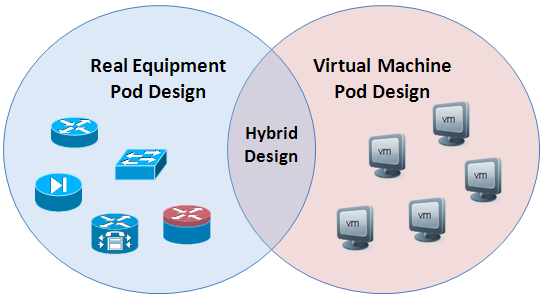
Every pod derives from a pod design and can accommodate topologies that include real equipment, virtual machines, or both.
Pure Virtual Machine Pods
A pure virtual machine pod contains one or more virtual machines and no real equipment.
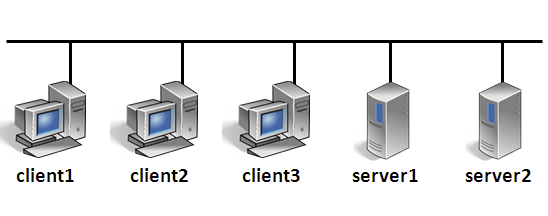
When a pod design contains only PCs and no managed lab devices, it is not necessary to allocate lab device ports and VLANs for control switches in the pod design. This is generally true if there are no special connectivity requirements and the PCs in the pod just communicate amongst themselves. Simply connect them to one or more virtual switches (VMnets).
If your pod has one PC, or PCs that do not need to communicate, then no virtual switches are required. The NETLAB+ viewers work with the VMware host to display the mouse, keyboard, and screen (MKS); the virtual machine does not require a network adapter or network connection for MKS.
Pure virtual machine pods have some special properties:
Virtual machine pods can be easily cloned using the NETLAB+ pod cloning tool.
Virtual machines in the pod may be connected using virtual networking.
Virtual networks can be created and removed automatically. No external networking is required (except for labs that require outbound Internet Access)
Network traffic is confined to the pod.
Pods can be “air-gapped” from real networks, providing a safe sandbox.
Pods do not need unique IP address schemes!
NETLAB+ provides mouse, keyboard, and screen access to each VM though its built-in Remote PC viewers. The communication endpoint for viewer sessions is the NETLAB+ server, not the virtual machines in the pod. Therefore, the air-gap between the pod network and the campus network is still preserved. NETLAB+ provides a built-in VNC viewer for Proxmox virtual machines, and a MKS viewer for VMware virtual machines.
Real Equipment Pods
A real equipment pod contains one or more real lab devices. NETLAB+ provides console access to real equipment using its built-in CLI Terminal application and an Asynchronous Terminal Server (ATS). This provides an “air-gap” between equipment pods and campus networks. No routing between pod networks and campus is required.
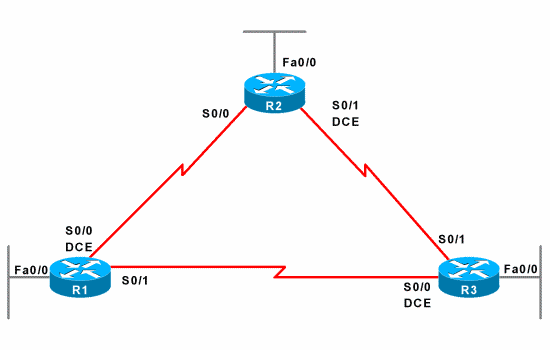
Internal connectivity between lab devices can be made with direct physical connections or through NETLAB+ control switches. The latter provides dynamic network flexibility for labs. In either case, the real equipment pods are isolated from the campus to maintain a safe sandbox for learners.
Hybrid Pods
A hybrid pod contains both real equipment and virtual machines. Hybrid pods are useful for labs that require both real equipment and virtual machines.
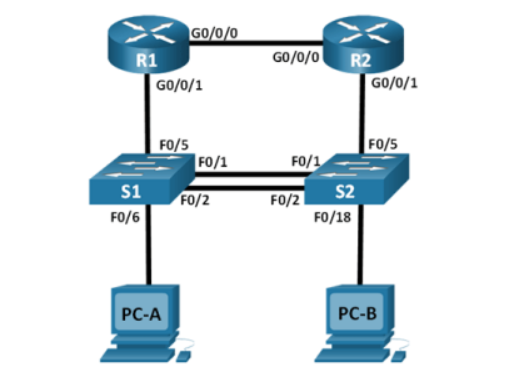
In a hybrid pod design, remote PCs and lab devices communicate with each other. Virtual machines (which are the remote PCs) connect to virtual switches on a virtual machine host (i.e., VMware ESXi). They are bound to real VLAN numbers by NETLAB+ and trunked to a pod’s designated lab device ports. In NETLAB+ version 22, this happens automatically.
Since NETLAB+ version 22, this is an automated process.
It is important to understand how real devices and virtual machines communicate with each other. Despite the interconnection of real and virtual, NETLAB+ provides the technology and methodology to isolate the entire pod from production networks while providing remote access to both real equipment and virtual machine consoles. Automated networking setup for hybrid pods to make the pod setup process significantly easier and less error-prone.
Best Practices
The following pod design practices are highly recommended, particularly if you are creating pod designs that will be redistributable to other organizations. These practices are followed by NDG during the planning and design of our pods.
Study all lab requirements carefully before pod design. Design pods that can service many labs and work across multiple curriculums if possible. Fewer pod types will increase adoption.
Minimize the number of physical devices and virtual machines in a pod. Leverage the NETLAB+ VLAN map feature with real equipment pods to do more labs with fewer devices in the pod. Smaller pods:
Consume fewer system resources and physical devices.
Tend to have a higher adoption.
Are better suited for asynchronous self-paced learning, which is the predominant modality for lab delivery using NETLAB+.
Create self-contained pods that do not require external or inter-pod network connectivity. This creates a safe sandbox for both users and host locations. It also allows labs to use a simple IP addressing scheme that is the same across all pods. Remember that NETLAB+ built-in viewers for virtual machines and console access provide an out-of-band “air-gap” between real networks in pods. This feature should be leveraged in most cases.
Create a pod guide (or web page) to assist others in setting up your pod design.