Networking
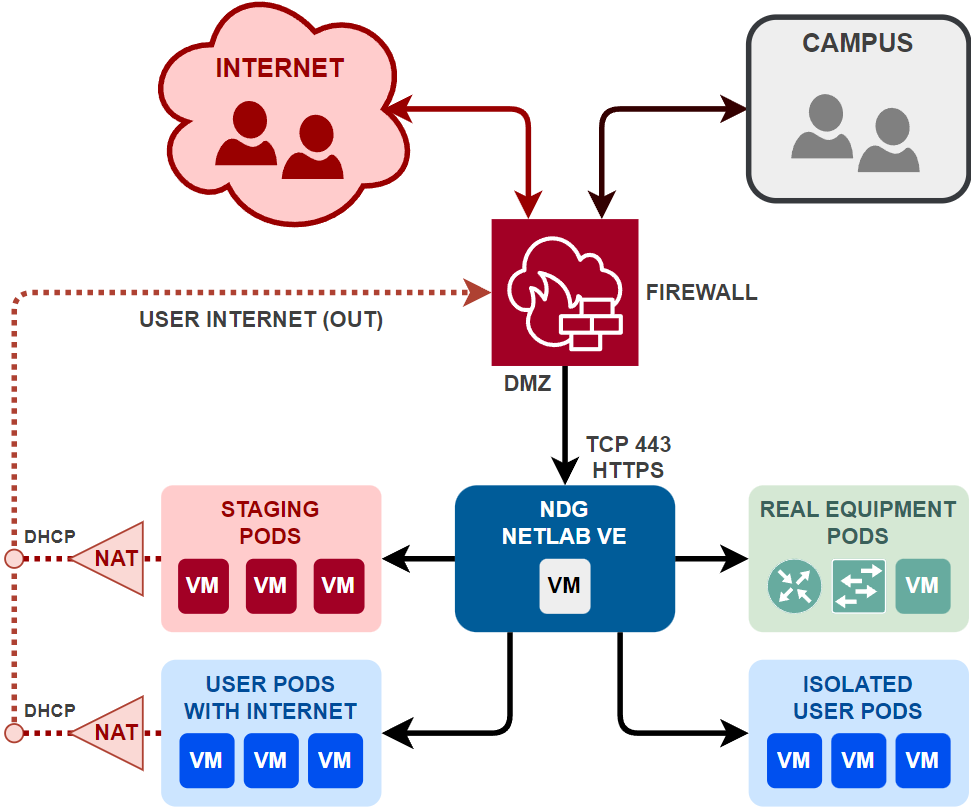
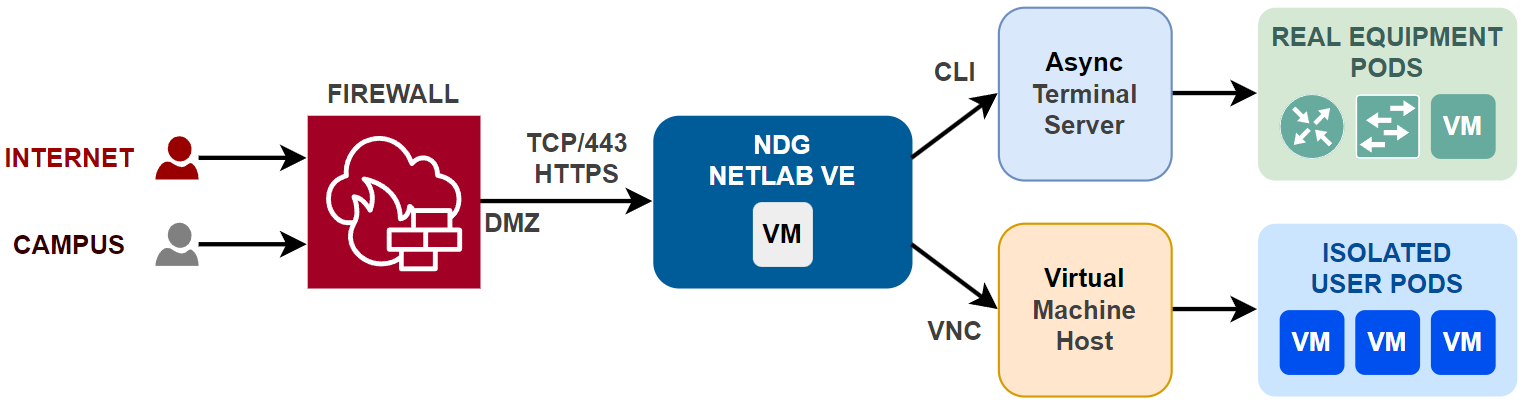
One of the most important aspects of NETLAB+ is its networking capabilities. By design, NETLAB+ is a proxy server that isolates both infrastructure and user pods from the campus and Internet. All normal user access flows through a single IP address (the NETLAB+ server IP address) and a single TCP port (HTTPS 443). The diagram below illustrates the logical network environment of NETLAB+.
Isolation Model
NETLAB+ is designed to isolate user pods from each other and from the NETLAB+ infrastructure. This isolation is achieved by proxying traffic through the NETLAB+ server, which acts as a gateway for all user access. Pods have their own networks and are isolated from each other. Routing between pods is not necessary, as each pod operates independently. Traffic is not typically routed between pods and users. Since pod networks are isolated, they do not require unique IP addresses, and allow labs to use the same IP address space without conflict.
Note
Depending on the lab content requirements, some pods may require routing between them, or to the Internet.

DMZ
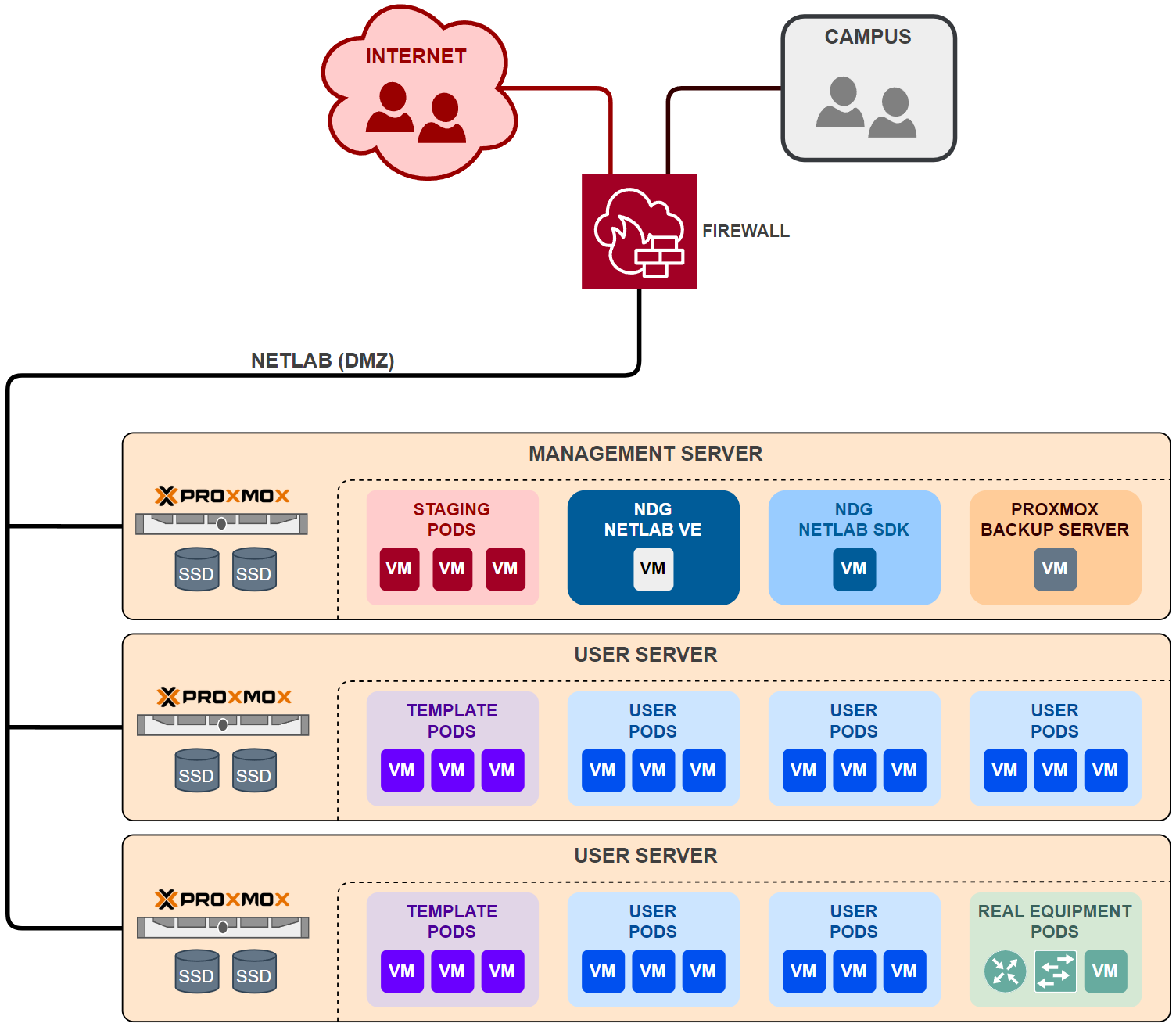
The NETLAB+ infrastructure should be placed on a DMZ or dedicated LAN. Traffic should flow freely between all hosts, virtual machines and components within the DMZ. NETLAB+ is the only component that requires inbound access from the Internet or campus networks. However, you may wish to allow limited access to other components in the DMZ, such as the virtual machine infrastructure servers, for management purposes. The diagram below illustrates the recommended physical network environment of NETLAB+.
IP Addressing
NETLAB+ requires a static IPv4 address on the DMZ facing interface. This is typically a private RFC 1918 address. See also Static NAT for more information on how to configure the NETLAB+ server to be accessible from the Internet.
Unsupported
DHCP is not supported on the NETLAB+ appliance. The NETLAB+ appliance must be configured with a static IP address on the DMZ facing interface.
Experimental
IPv6 can also be configured on the NETLAB+ appliance on the DMZ facing interface.
DNS
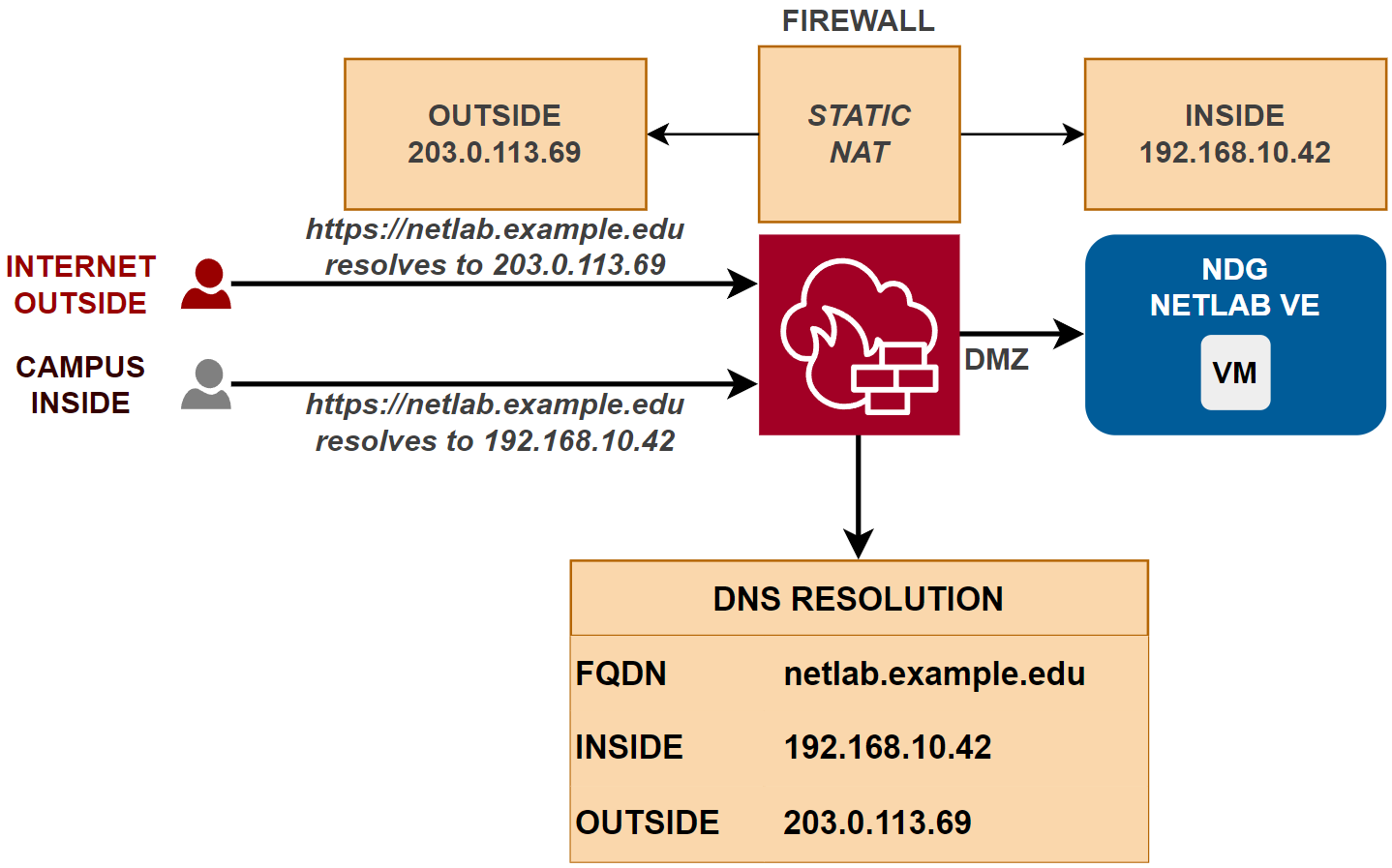
DNS should be configured to resolve the FQDN of the NETLAB+ appliance to the public IP address for Internet users, and to the private IP address for users on the campus network. Most firewalls translate DNS requests in this manner when configured for static NAT.
Unsupported
NETLAB+ does not support dynamic DNS (DDNS) or access by IP address. A valid DNS record for the NETLAB+ appliance is required.
TLS and Certificates
NETLAB+ uses TLS to secure communication between the NETLAB+ server and users. The certificate must match the FQDN of the NETLAB+ server exactly, or be a domain wildcard certificate that includes the FQDN of the NETLAB+ server. The production certificate must be signed by a trusted Certificate Authority (CA). There are three options for obtaining and managing TLS certificates:
Use Let’s Encrypt.
Provide your own TLS certificate and private key.
Use NETLAB+ to generate a private key and Certificate Signing Request (CSR) and have it signed by a Certificate Authority (CA) of your choice.
Site Firewall
Since the NETLAB+ system is usually installed behind a firewall, many steps have been taken to make NETLAB+ secure and firewall-friendly. However, some TCP/IP ports will need to be opened to the NETLAB DMZ. These ports are covered in detail in later sections. Some firewall features or security devices may not be compatible with NETLAB+.
Static NAT
NDG supports static one-to-one NAT for the NETLAB+ appliance.
Static NAT is a type of NAT in which a single private IP address (A) is mapped to a single public IP address (B), where the public address is always the same IP address (i.e., it has a static address). This allows an internal host to have an unregistered (private) IP address and still be reachable over the Internet. This mapping should occur in both directions: traffic sent to public address B should be forwarded to private address A, and traffic sent from private address B should appear on the Internet as public address A.
Unsupported
Dynamic NAT and port address translation (PAT) are not supported.
Deep Packet Inspection (DPI)
Deep Packet Inspection (DPI)
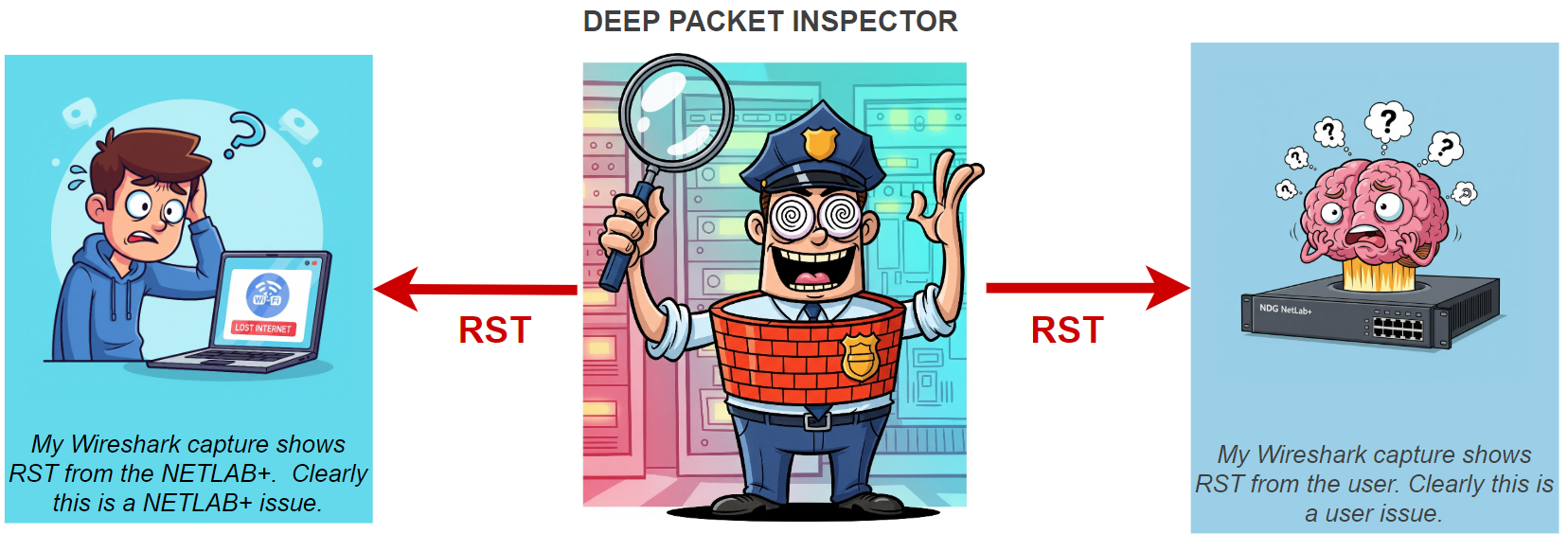
NDG does not support or recommend Deep Packet Inspection (DPI) on traffic to and from the NETLAB+ appliance. Firewalls and security devices that enable DPI may silently “reset” connections without warning, which can cause NETLAB+ to malfunction. Neither NETLAB+ nor the user receives an error indication why a connection dropped. This is extremely difficult to troubleshoot because it requires protocol analysis and firewall access. If you are using a firewall that supports DPI, please disable it for traffic to and from the NETLAB+ appliance.
Inbound Ports
Since the NETLAB+ system is usually installed behind a firewall, many steps have been taken to make NETLAB+ secure and firewall-friendly. However, some TCP/IP ports will need to be opened through the firewall to the NETLAB DMZ. The table below summarizes the inbound ports that are used by the NETLAB+ virtual appliance. Not all ports are required for all configurations.
Ports |
Protocol |
Required |
Description |
|---|---|---|---|
TCP/443 |
HTTPS |
Required |
NETLAB user access, LTI |
TCP/22 |
SSH |
Optional |
NDG support |
TCP/80 |
HTTP |
Optional |
Let’s Encrypt |
TCP/9000 |
HTTPS |
Optional |
NETLAB+ SDK |
TCP/9100 |
HTTPS |
Optional |
Prometheus |
User Access
NETLAB+ is designed to be accessed by users via a web browser. HTTPS is used for the user interface. Websockets are used to access virtual machine consoles and lab devices. Users do not need direct access to lab resources as NETLAB+ provides a secure proxy for this.
Ports |
Protocol |
From |
To |
Required |
|---|---|---|---|---|
TCP/443 |
HTTPS |
Users |
NETLAB+ |
Required |
TCP/443 |
HTTPS |
LMS |
NETLAB+ |
Optional |
The following types of communication use inbound port TCP/443:
User and administrator web access from a browser
CLI access to lab devices (websocket application)
Virtual machine console access (websocket application)
Learning Tool Interoperability (LTI) with an LMS (optional)
Prometheus metrics access (optional)
NDG Support access
Learning Tool Interoperability (LTI)
Ports |
Protocol |
From |
To |
Required |
|---|---|---|---|---|
TCP/443 |
HTTPS |
LMS |
NETLAB+ |
Optional |
TCP/443 |
HTTPS |
NETLAB+ |
LMS |
Optional |
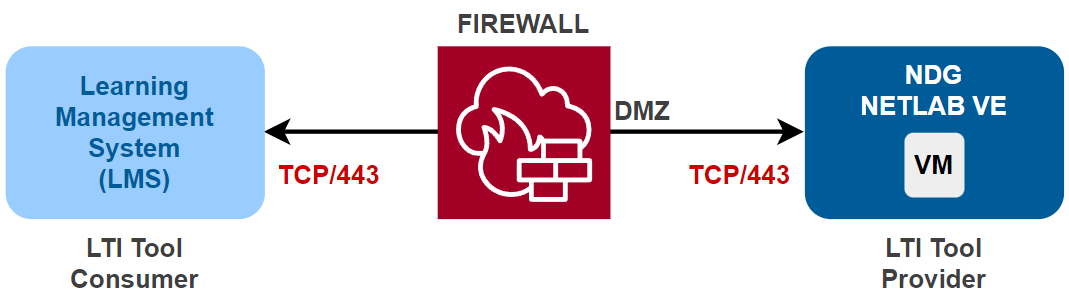
NETLAB+ can be configured as an LTI Tool Provider (TP). LTI leverages standard web communication protocols, primarily HTTPS, for its secure messaging. LTI requires inbound access from your Learning Management System to the NETLAB+ server on port TCP/443.
SSH Inbound
Ports |
Protocol |
Required |
Description |
|---|---|---|---|
TCP/22 |
SSH |
Optional |
This port is used for NDG support. |
As specified in the NETLAB+ support agreement, NDG Support often requires access to the NETLAB+ server for. You can enable SSH inbound for this purpose. Alternatively, you can use the NDG Remote Support Service.
Let’s Encrypt
NETLAB+ can automatically obtain and renew SSL/TLS certificates from Let’s Encrypt to secure the user interface. This is done using the HTTP-01 challenge, which requires access to port TCP/80. If you are using a commercial SSL/TLS certificate, then this port is not required. If you are using Let’s Encrypt, then you must also ensure that the NETLAB+ server is publicly accessible on port TCP/80.
Ports |
Protocol |
Required |
Description |
|---|---|---|---|
TCP/80 |
HTTP |
Optional |
Only required for Let’s Encrypt. |

Note
Traffic on port TCP/80 not associated with Let’s Encrypt will be redirected to port TCP/443.
NETLAB+ SDK
NETLAB+ provides a Software Development Kit (SDK) that allows users to automate management of NETLAB+ using Python. The SDK uses a REST API that requires access to port TCP/9000. If you are running the SDK on the management server, then this port does not need to be open to the DMZ. If you are running the SDK on a separate server outside the DMZ, then you will need to open TCP/9000 to the NETLAB+ server.
Ports |
Protocol |
Required |
Description |
|---|---|---|---|
TCP/9000 |
HTTPS |
Optional |
Only required for SDK access outside of the DMZ. |

Prometheus
NETLAB+ can be configured to collect metrics from the NETLAB+ server using Prometheus. These metrics can be visualized with Grafana Prometheus requires access to port TCP/9100 from the Prometheus server to the NETLAB+ server. If you are using Prometheus to monitor NETLAB+, it may be helpful to open this port to networks where the system administrator will access the Prometheus web interface. NETLAB+ can also be configured to access Prometheus metrics via TCP/443 if the Prometheus server resides on the Internet. If you run Prometheus on the management server, then this port does not need to be open to the DMZ.
Ports |
Protocol |
Required |
Description |
|---|---|---|---|
TCP/9100 |
HTTPS |
Optional |
Only required for Prometheus access outside of the DMZ. |
TCP/443 |
HTTPS |
Optional |
Alternate access to Prometheus metrics via the Internet. |

Outbound Ports
NETLAB+ sources traffic to the Internet for various purposes, such as software updates, license validation, and other services. The following table summarizes the outbound ports that are used by the NETLAB+. Each port is described in greater detail in the following sections.
Ports |
Protocol |
Required |
Description |
|---|---|---|---|
TCP/443 |
HTTPS |
Required |
NDG Central Support Servers |
TCP/8007 |
HTTPS |
Required |
NETLAB+ VM Distribution Server |
UDP/53 |
DNS |
Required |
Domain Name System Servers |
UDP/123 |
NTP |
Required |
Network Time Protocol Servers |
TCP/443 |
HTTPS |
Optional |
LMS/LTI |
TCP/587 |
SMTP/TLS |
Optional |
Secure SMTP email notifications (future) |
TCP/443 |
TLS |
Optional |
|
UDP/443 |
QUIC |
Optional |
NDG Remote Support Service |
TCP/444 |
KCP |
Optional |
NDG Remote Support Service |
Important
This list does not include all outbound ports used within the NETLAB+ DMZ. Some ports may be used by the NETLAB+ infrastructure components, such as the Proxmox VE or VMware ESXi servers, for management purposes. These ports are not listed here. Do not restrict traffic on the NETLAB+ DMZ.
Learning Tool Interoperability (LTI)
Ports |
Protocol |
Required |
|---|---|---|
TCP/443 |
HTTPS |
Optional |
NETLAB+ supports Learning Tool Interoperability (LTI) to integrate with Learning Management Systems (LMS) such as Canvas and Moodle. This requires both inbound and outbound access to the LMS server on port TCP/443.
NDG Central Support Servers
Ports |
Protocol |
Required |
Description |
|---|---|---|---|
TCP/443 |
HTTPS |
Required |
NETLAB+ Central Support Servers |
The following services make outbound connections from the NETLAB+ server to NDG Central Support Servers. These servers are used for:
Software updates
License activation and validation
Course catalog updates
Remote Support access (optional)
TODO: image
NDG Remote Support Service
The NDG Remote Support Service is a secure encrypted outbound connection that allows NDG support to access your NETLAB+ system for troubleshooting and maintenance. It provides a secure way for NDG to access your system without requiring SSH to be open inbound. The service is disabled by default, but can be enabled from the NETLAB+ system console. Once enabled, NDG support can access your NETLAB+ virtual machine and optionally your NETLAB+ infrastructure components, such as the Proxmox VE or VMware ESXi servers, for troubleshooting and maintenance. Any one of the ports listed below can be used to establish the connection. NETLAB+ can also try any of the ports listed below to establish the connection.
Ports |
Protocol Options |
From |
To |
|---|---|---|---|
TCP/443 |
TCP/443 |
NETLAB+ |
NDG Remote Support Service |
TCP/443 |
TCP/443 + TLS |
NETLAB+ |
NDG Remote Support Service |
UDP/443 |
443 UDP + QUIC |
NETLAB+ |
NDG Remote Support Service |
TCP/444 |
444 TCP + KCP |
NETLAB+ |
NDG Remote Support Service |
TODO: image
Important
In certain situations, NDG Support may request remote access to the NETLAB+ system to help troubleshoot configuration issues, software bugs, or unexpected system behavior as outlined in the NETLAB+ Customer Agreement. This can be done by enabling the NDG Remote Support Service outbound, or by providing inbound SSH access. Remote access is also required for participation in beta software releases.
Administrative Ports
The following ports are used for administrative access to the NETLAB+ infrastructure components, such as the Proxmox VE or VMware ESXi servers. These ports are not required for normal user access to NETLAB+. They are used by system administrators to manage the NETLAB+ infrastructure. These ports are typically not accessible from the Internet or campus networks, and are only accessible from the NETLAB+ DMZ or management network. However, an administrator may wish to provide access to these ports from a management network.
Ports |
Protocol |
From |
To |
Required |
Description |
|---|---|---|---|---|---|
TCP/8006 |
HTTPS |
Administrator |
Proxmox |
Optional |
Proxmox VE management interface |
TCP/8007 |
HTTPS |
Administrator |
Proxmox |
Optional |
Proxmox Backup Server |
TCP/443 |
HTTPS |
Administrator |
VCSA |
Optional |
VMware vSphere management interface |
TCP/8443 |
HTTPS |
Administrator |
VCSA |
Optional |
VMware vSphere management interface |
TODO: image
Ports in the DMZ
Not all ports used by NETLAB+ are listed here. Additional ports and protocols may be used by NETLAB+ and the nodes connected to the NETLAB+ DMZ.
Important
Traffic within the NETLAB+ DMZ should not be restricted.