Switch Configuration Tasks
The NETLAB+ Professional Multi-Purpose Academy Pod (PMAP) requires additional switch configuration tasks for successful operation. Using PuTTy or other terminal software, connect to the console port of the control switch to which the NETLAB+ Professional Multi-Purpose Academy Pod (PMAP) is connected. The following passwords are used on the control switch.
Console login password |
router |
Enable secret password |
cisco |
Warning
Please do not change the passwords, they are used by NETLAB+ automation and technical support.
Verify Control Switch IOS Version
Each control switch should be running the minimum required image. Earlier versions may have defects that affect NETLAB+. For a complete, up-to-date list, reference here: https://www.netdevgroup.com/support/control_devices.html#control_switch
Configure Control Switch Ports
There are several essential commands that must be manually configured on each control switch port that connects to a lab switch (S1 and S2 in this case).
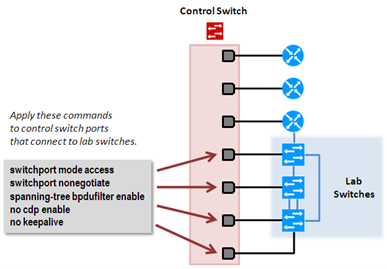
Locate the 2 control switch ports connecting to S1 and S2. Refer to the cabling diagram if necessary. The following commands must be manually added to each switch port.
switchport mode access
Prevents the link from becoming a trunk port.
The labs will not work as designed if the link between control switch and lab switch is trunking.
Trunking on ports that should be access ports, combined with BPDU filtering, creates loops that are not prevented by spanning-tree.
switchport nonegotiate
Prevents the interface from sending DTP messages.
Disabling DTP messages is not critical, but will hide the control switch’s MAC address from lab switches when users are performing commands to see the CAM table.
spanning-tree bpdufilter enable
Instructs control switch port not to send and receive spanning-tree BPDU frames to and from the lab switch.
Spanning tree in the lab must not mingle with spanning tree on the control switch. This would cause several undesirable effects in both the lab and on the control switches.
no cdp enable
Disabling CDP is not critical, but will hide the control switch from lab switch users performing CDP commands.
no keepalive
Prevents the interface from sending L2 keepalive messages.
Disabling L2 keepalives messages is not critical, but will hide the control switch’s MAC address from lab switches when users are performing commands to see the CAM table.
Danger
Do not omit these commands! Without them, loops will form causing high CPU utilization, error-disabled ports, and connectivity loss. These commands are specific to switch pods and are not automatically configured.
Example switch port configuration from a control switch. Interface numbers will vary.
interface FastEthernet0/12
 description port to S1 port 6
 switchport mode access
 switchport nonegotiate
 spanning-tree bpdufilter enable
 no cdp enable
 no keepalive


interface FastEthernet0/13
 description port to S2 port 18
 switchport mode access
 switchport nonegotiate
 spanning-tree bpdufilter enable
 no cdp enable
 no keepalive
Initial Lab Switch Setup
Note
By default, these switches will not respond to a console break signal the same way routers do. There are two environment variables that affect this: Enable Break and BOOT path-list.
The following procedure explains how to check these variables and set them so that the console port will respond to a break signal.
When to Use
You must initialize the environment variables when:
Installing a lab switch for the first time.
The Enable Break environment variable is set to “no”.
The BOOT path-list environment variable is set.
Note
This procedure does not apply to control switches.
Determining the Boot Status
From the enable mode, issue the following IOS command.
Lab_Sw# show boot

BOOT path-list:       flash:c2950-i6q4l2-mz.121-22.EA4.bin
Config file:          flash:config.text
Private Config file:  flash:private-config.text
Enable Break:         no
Manual Boot:          no
Setting Up the Environment
Follow this procedure if Enable Break is set to “no” and/or the boot path-list is set to an image.
Lab_Sw# configure terminal
Lab_Sw(config)# boot enable-break
Lab_Sw(config)# no boot system
Lab_Sw(config)# end
Lab_Sw# copy run start
Lab_Sw# show boot

BOOT path-list:

Config file:          flash:config.text
Private Config file:  flash:private-config.text
Enable Break:         yes
Manual Boot:          no
Note
For Cisco Catalyst 3650 Series switches, the procedure for enabling break is slightly different, see below.
Lab_Sw# configure terminal
Lab_Sw(config)# boot enable-break
Lab_Sw(config)# boot system flash:packages.conf
Lab_Sw(config)# end
Lab_Sw# copy run start
Lab_Sw# show boot
Verification
With Enable Break set to “yes” and removal of a BOOT path-list, a pod test should pass.
If the environment variables are not set correctly, you may experience one of the following symptoms:
Pod test fails with a message such as “unable to put the switch into monitor mode”.
Lab automation such as scrub fails.
Users cannot perform password recovery (automated or manual.