Control Device Requirements
NETLAB+ control devices provide internal connectivity, console access, and managed power. Control devices are dynamically managed by NETLAB+ and are not accessible or configurable by lab users.
A NETLAB+ Multi-Device Pod (MDP) requires the following control device resources:
Control Device Resource |
Quantity Required |
|---|---|
Control Switch |
4 consecutive ports |
Access Server |
4 lines |
Power Distribution Units |
4 outlets |
Control Switch Overview
NETLAB+ uses a control switch to provide connectivity between devices in a NETLAB+ Multi-Device Pod (MDP) and Proxmox VE server(s). This pod requires 4 consecutive ports on a supported control switch.
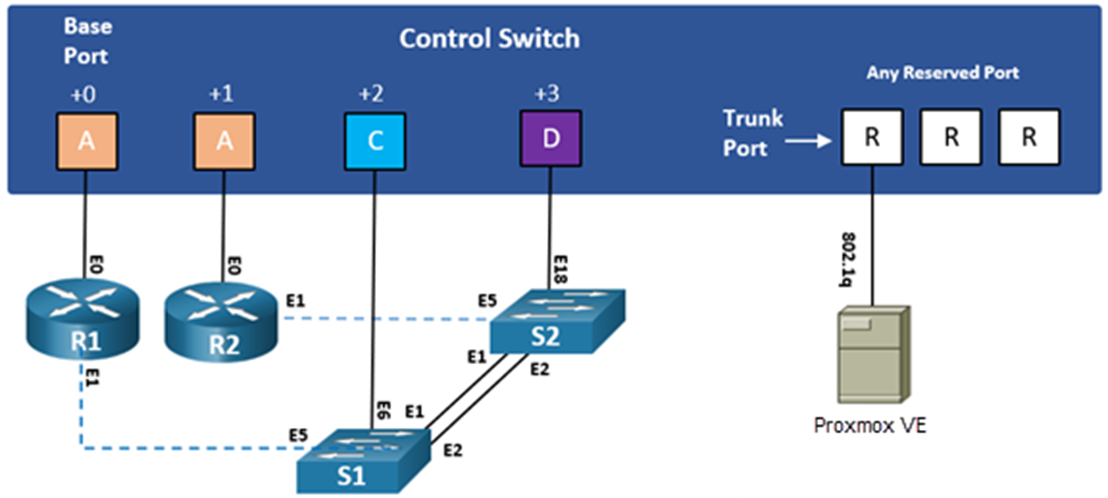
Ports are labeled +0 to +3 in the diagram and are relative to the base port. These ports must be consecutive on the same control switch. As with all pods, you choose a base port for the pod during pod installation. A control switch can support multiple pods. To determine the actual port numbers used for this pod, add the base port number to the relative port numbers shown in the diagram. For example, if the base port is 4, the actual port numbers will be 4 to 7.
Using SNMP, NETLAB+ will automatically set up VLANs and configure ports on the control switch. These VLANs are depicted as letters “A” through “D” and represent one subnet in the topology. Each NETLAB+ pod has a unique VLAN pool, and the actual VLAN numbers will be unique for each NETLAB+ pod. This is to avoid conflict between multiple pods.
One “reserved” port on the control switch connects to an 802.1q NIC card on the Proxmox VE server. This allows devices in the pod to communicate with virtual machines.
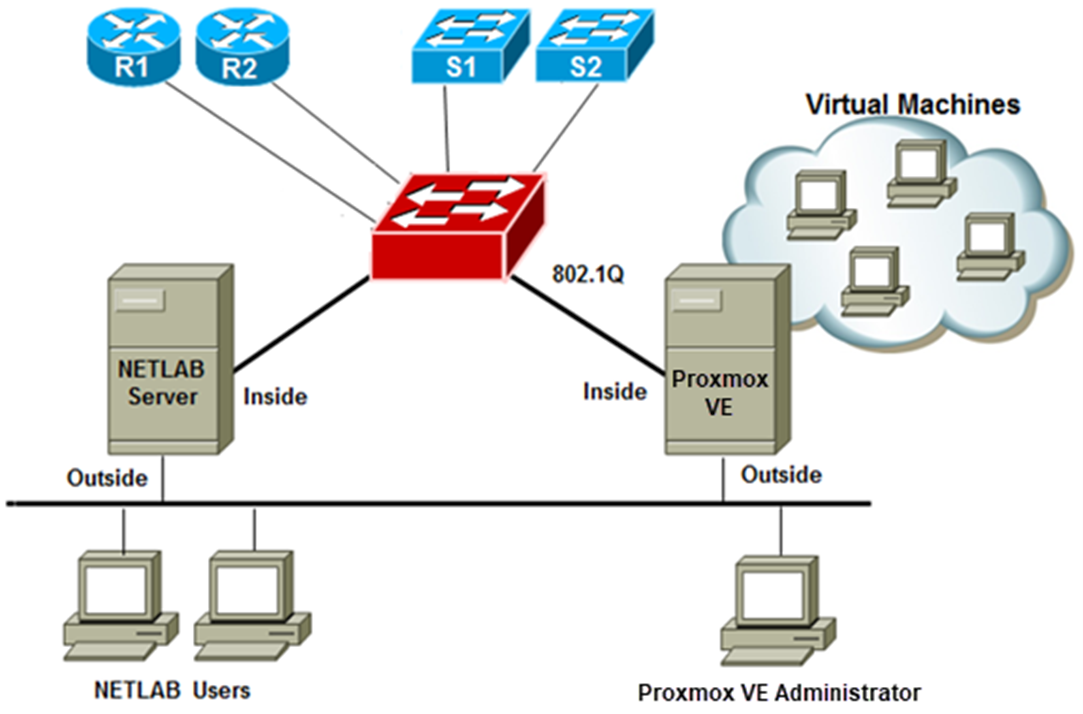
The reserved port may be located on a different control switch, provided that all links between control switches are also configured as 802.1q trunks, and all VLANs are allowed. You may also have more than one Proxmox VE server.
Note
It is important that control switches are equipped with the minimum required image. For a supported list of device images for the control switch, please visit: https://www.netdevgroup.com/support/netlabve_control_devices.html#control_switch
Access Server Ports
Access servers provide console connections to lab routers so that users can access them from NETLAB+. Users do not communicate directly with the access server. Rather, all connections are proxied through NETLAB+.
A NETLAB+ Multi-Device Pod (MDP) requires 4 access server ports.
Note
These ports do not have to be consecutive and can span multiple access servers.

Note
It is important that access servers are equipped with the minimum required image. To view the most current recommended device image for the access server, please visit: https://www.netdevgroup.com/support/netlabve_control_devices.html#access_server
Power Distribution Units
Power distribution units (PDUs), also known as switched outlet devices, provide managed electrical power, allowing NETLAB+ and users to turn lab equipment on and off.
A NETLAB+ Multi-Device Pod (MDP) requires 4 outlets, one for each pod device.
Note
Outlets do not have to be consecutive and may span multiple PDUs (i.e., APC7900 or APC7920).

Upload IOS Images
Upload the IOS images for the lab routers. NETLAB+ will recover these images on the devices if they are erased from flash.